LetterSchool - Learn to Write
- 4.4
- Rating
- 5.00M
- Installs
- Free
- Price
 Analysis by App-foxy
Learning to write can be frustrating for a young child, especially when a pencil, worksheet, or adult correction makes practice feel like work. I found LetterSchool - Learn to Write more approachable because it turns early handwriting practice into a short, touch-based game. The child traces letters on a screen, repeats the movement, and gets a more playful reason to keep trying.
This is an educational game from Letterschool Enabling Learning, aimed at children who are beginning to recognize and form letters. It is free to start, rated for Everyone, and has reached over 5 million installs. That popularity makes sense: the idea is immediately understandable, and a child can begin using it without needing to read a complicated explanation first.
How the writing practice feels in everyday use
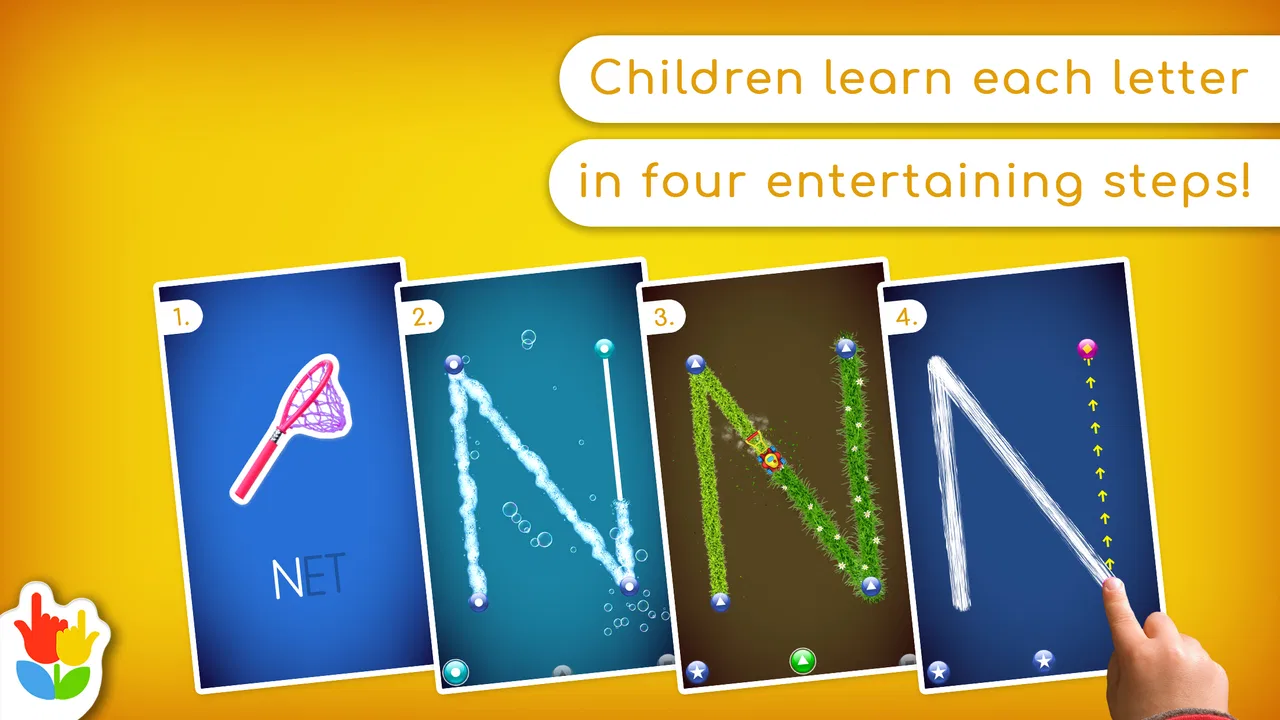
The central activity is letter tracing. Instead of asking a child to copy a letter from a worksheet, the game gives the finger a guided path to follow. That difference matters for children who are still developing hand control. The screen provides a clear boundary for the movement, while the game-like presentation makes repetition less intimidating.
You May Also Like

 Blood Strike: 2.5 Anniversary
Blood Strike’s Loadouts Turn Every Drop Into a Tactical Gamble
A close look at Blood Strike’s custom loadouts: how fast access to signature weapons reshapes its battle royale rhythm, rewards preparation, and narrows the gap between fights.

 Pandora - Music & Podcasts
Pandora’s Music Is Easy to Start, but Harder to Recover
Pandora’s strength is its low-effort path from a seed to a station. Its weak spot is how much confidence it asks you to place in connection, setup, and quiet recovery.

 8 Ball Pool
 Is Built on Rivalries, Rematches, and Routine
A close look at the rivalries, rematches, shared routines, and unanswered safety questions that turn a quick pool match into a persistent mobile community.

 Samsung Music
’s Quiet Strength Is Playing What You Already Own
Its reach comes less from spectacle than from dependable access to a personal library. That simplicity is both the app’s strongest retention engine and its ceiling.

 AccuWeather: Weather Radar
AccuWeather Review: A Quick, Clear Forecast for Everyday Decisions
For everyday plans, the best forecast is the one you can understand quickly. AccuWeather makes rain timing, radar, and local conditions easy to act on, with a few trade-offs.

 Hill Climb Racing
Why Hill Climb Racing Still Turns Crashes Into One More Run
A tiny car, a bumpy hill and one more upgrade: Hill Climb Racing keeps resurfacing because its simple chaos makes every near-miss feel personal.
More From Our News Desk



I would use it as a short practice activity rather than as a complete reading or handwriting course. A child might spend a few minutes working on letters before breakfast, during a quiet afternoon, or while waiting for an appointment. The best results come when an adult treats it as one small part of learning, then follows up with paper, crayons, magnetic letters, or conversation.
One useful detail is that touch tracing separates the movement from the pressure and grip required by a pencil. That makes it a gentle starting point for a child who is not ready for sustained handwriting. At the same time, it creates a limitation: accurate finger movement on glass does not automatically mean the child can form the same letter with a pencil. I would not replace physical writing practice with this game; I would use it to build familiarity and confidence before moving to paper.
The app is particularly suitable for children who respond well to repetition with immediate visual feedback. A child who loses interest after one worksheet may be more willing to repeat a letter when the activity feels like a small challenge. Parents can also observe which letters cause hesitation and then practice those shapes away from the screen.
What the free starting point really means
The game is listed as free, so families can try the basic experience without paying an upfront purchase price. That is helpful when you are unsure whether your child will enjoy tracing on a phone or tablet. It also makes the app easier to test alongside other early-learning tools rather than committing money before seeing whether it fits your child’s attention span.
There are in-app purchases ranging from $2.99 to $59.99 per item. I would therefore check the available content and purchase screen before handing the device to a child. The free entry point is useful, but it should not be confused with unlimited access to every part of the experience. The difference between trying the app and paying for expanded access is important for families comparing it with a workbook or a one-time educational purchase.
Because the listed price range is broad, the value depends on what your child actually uses. If the free material is enough for occasional letter practice, paying may not be necessary. If the app becomes part of a regular routine and the additional material matches your child’s stage, a purchase could be worthwhile. I would make that decision after watching how consistently the child returns to the activity, not simply because the app has a large install base.
The current version is 2.6.5 and it runs on Android 5.0 or later. That makes it relevant for families using an older compatible Android device as a dedicated learning screen. Still, I would test the app on the actual device first, because the experience of tracing depends heavily on screen size, touch responsiveness, and whether the child can comfortably see the letter path.
Where it delivers genuine learning value
The strongest value is its narrow focus. Many children’s learning apps try to combine letters, numbers, songs, stories, puzzles, and rewards. That variety can be entertaining, but it can also make it difficult to tell what the child is practicing. Here, the purpose is clearer: the child is working on letter shapes and the movements used to draw them.
That focus makes it useful in three situations. First, it can introduce a child to the basic direction and shape of a letter before formal handwriting lessons. Second, it can provide extra repetition for a child who needs more practice than a classroom schedule allows. Third, it can act as a low-pressure warm-up before using a pencil, especially when the child is tired or reluctant.
A practical routine would be to choose only a small number of letters in one sitting. After the screen activity, I would ask the child to find the same letter in a book, say its sound, and try drawing it with a crayon. This three-step sequence connects tracing with recognition, spoken language, and real writing. The app is most valuable when it supports that wider routine rather than becoming the entire lesson.
Another non-obvious strength is that digital tracing can make mistakes feel less permanent. On paper, a child may become upset by an uneven line or an oversized letter. On a screen, repeating the movement feels quicker and less costly. That can encourage experimentation. The trade-off is that the child may become comfortable with guided paths and then struggle when the visual support disappears, so I would gradually reduce screen help by asking for independent attempts on paper.
The Everyone age rating is reassuring for its intended audience, but it does not tell a parent how much supervision is useful. Younger children may still need help holding the device, understanding where to begin, and stopping when their attention fades. I would stay nearby during early sessions, not to correct every movement, but to turn the activity into a conversation about letter names, sounds, and shapes.
How it compares with worksheets, videos, and broader learning games
Compared with a worksheet, the game offers more immediate interaction and less setup. A child can begin tracing without a pencil, eraser, or printed page. It is also easier to repeat a movement without filling a table with uneven attempts. For a child who finds worksheets dull, that difference may be enough to create a useful practice habit.
Worksheets still have advantages. They develop pencil control, use real-world materials, and show the child that writing happens away from a screen. They are also easier for an adult to customize. I would choose paper first when the main goal is grip, pressure, spacing, or writing a child’s own name. I would choose this game first when the child needs an inviting introduction to letter formation.
Video lessons can explain sounds, songs, and stories more naturally, but they often encourage watching rather than doing. This app’s value is that the child must make a movement. A broader alphabet game may provide more variety, yet it may spend less time on the physical shape of each letter. The right choice depends on the gap you are trying to address: LetterSchool is more focused on formation than on delivering a complete literacy curriculum.
It is also worth remembering that tracing is not the same as understanding. A child may follow a path accurately without knowing the letter’s sound or recognizing it in a word. I would pair each practice session with simple questions such as “What letter is that?” or “Can you find another one?” If the child cannot answer, the next step should be language practice, not simply more tracing.
Small habits that make the app work better
Keep sessions short enough that the child finishes feeling successful. Long practice can turn a playful activity into another demand, especially for children with limited fine-motor stamina. I would stop after a few focused letters rather than pushing through the entire alphabet. Returning later is usually more useful than insisting on one extended sitting.
Use the app on a stable surface when possible. A child who has to balance a phone in one hand while tracing with the other is practicing device handling as much as letter formation. A larger screen can make the path easier to see, while a smaller phone may be convenient but cramped for a beginner. This is one reason a quick trial on your household device matters more than relying on the app’s general popularity.
Try not to take over the child’s finger. If an adult guides every movement, the result may look correct while the child learns very little about controlling the stroke. Instead, describe the movement in simple language and let the child attempt it. If frustration appears, switch to a familiar letter or take a break rather than turning the activity into a test.
Finally, connect the digital letter to something meaningful. After tracing an “M,” look for that letter in the child’s name, on a food package, or in a favorite book. This is a more powerful follow-up than immediately opening another level because it shows why the shape matters beyond the game.
Where the experience may fall short
The biggest limitation is the screen itself. Touch tracing can build recognition of letter shapes, but it cannot fully reproduce the resistance of paper or teach every part of handwriting. Children who need help with pencil grip, hand strength, spacing, or writing on a line will need other activities. I would skip this as a primary tool if a teacher or occupational professional has recommended a specific physical-writing program.
Another possible friction point is the purchase structure. Free access lowers the barrier to trying the game, but families should be comfortable reviewing optional purchases and deciding whether expanded content justifies the cost. The top of the listed range is much more than the price of a simple workbook, so I would not make a purchase casually. The app can be useful without becoming a major part of a child’s learning budget, provided the free experience meets your needs.
The narrow focus may also feel repetitive for children who already recognize letters and write them comfortably. If your child is ready for phonics, spelling, sentence building, or reading comprehension, this game is unlikely to be enough on its own. A broader literacy app, a decodable book routine, or direct practice with an adult may offer more relevant progress at that stage.
Parents should also consider attention style. Some children enjoy repeating the same movement, while others need stories, physical objects, or social interaction to stay engaged. If your child quickly swipes away from tracing or asks for more varied activities, the app may be better as an occasional warm-up than a daily program.
Who is most likely to get value from it?
I think it is a good fit for a preschool or early-school child who is beginning to form letters, especially one who is hesitant about paper practice. It can also help families looking for a simple activity during travel or quiet time, as long as an adult keeps the session purposeful and does not treat the device as a substitute for conversation.
It may be especially useful when a child needs repeated exposure to letter shapes but becomes discouraged by visible mistakes. The digital format offers a softer entry point, and the free starting price makes experimentation easier. Families with an older compatible Android device may also appreciate that the minimum operating system is Android 5.0 rather than requiring a recent phone or tablet.
I would recommend skipping it, or using it only briefly, if your child already writes the alphabet independently, needs structured phonics instruction, or has handwriting difficulties that require physical exercises. I would also skip a paid expansion if your child rarely returns to the free material. The number of installs and the 4.1 average rating show that many users find it worthwhile, but neither tells me whether it matches your child’s learning stage or preferred way of practicing.
For parents, the best question is not “Will this teach my child everything?” It will not. The better question is “Will guided tracing make my child more willing to practice letter shapes today?” If the answer is yes, it has a clear place in a balanced routine.
My buying recommendation
After using it as a focused handwriting aid, I would recommend trying the free version before considering any in-app purchase. The free entry point gives you a chance to see whether your child understands the tracing activity, enjoys repeating it, and can use your device comfortably. Watch for actual engagement rather than assuming that a child will use it simply because it is labeled educational.
Paid access becomes easier to justify when the app fills a specific need: regular extra practice, a calmer introduction to writing, or a convenient activity that your child willingly repeats. I would compare the cost with the child’s likely use, not with the app’s popularity. If the child uses it once and returns to paper happily, keep the free option and spend nothing further.
My final view is positive but measured. This is a focused educational game, not a replacement for books, conversation, crayons, worksheets, or teacher guidance. Its best contribution is making the first steps of letter formation feel less intimidating and more repeatable. For a child who needs that gentle start, LetterSchool - Learn to Write is worth trying. For a child who needs deeper reading instruction or hands-on handwriting correction, another tool should lead the routine.
FAQs for LetterSchool - Learn to Write
01What age group is LetterSchool - Learn to Write suitable for?
LetterSchool is designed for young children, typically aged 3 to 7 years old. It aims to teach them how to write letters and numbers in a fun and interactive way. The app uses engaging animations and games to keep children entertained while they learn, making it ideal for preschool and early elementary school students.
02Does LetterSchool require an internet connection to use?
LetterSchool can be used offline, which is a great feature for parents who want to keep their children entertained and learning on the go. However, an internet connection may be required for downloading updates or accessing additional content within the app. It’s always best to download any necessary resources before going offline.
03Is there a cost associated with using LetterSchool?
LetterSchool offers a free version with basic features, but to access the full range of content, a paid subscription or one-time purchase may be required. This premium version includes additional letters, numbers, and educational games. Checking the app store for the latest pricing details is recommended, as costs can vary.
04What educational benefits does LetterSchool provide?
LetterSchool helps children develop fine motor skills, hand-eye coordination, and early literacy skills. By tracing letters and numbers, children learn correct formation and improve their writing technique. The app also reinforces letter recognition and phonics, providing a comprehensive early learning experience that's both effective and enjoyable.
05Are there parental controls or monitoring features in LetterSchool?
LetterSchool includes parental control features that allow parents to monitor their child's progress and customize the learning experience. Parents can set specific goals, track completed activities, and adjust difficulty levels to suit their child's learning pace. This ensures that the app remains a safe and educational tool for young learners.
Pros
- Engaging animations keep kids interested.
- Interactive lessons make learning fun.
- Supports multiple languages for diversity.
- No ads to distract from educational content.
- Tracks progress for personalized learning.
Cons
- Limited content in free version.
- Requires internet for some features.
- May be too simplistic for older kids.
- Occasional app crashes reported.
- High battery usage during extended play.

LetterSchool - Learn to Write
Gallery